EO Care 360° · Clinician experience · Patent pending

Predicting Cancer Treatment Symptoms Before They Hit

EO Care 360° is clinical decision support for the side effects of cancer treatment. Bayesian models forecast a patient's symptom burden for the next 30 days, the oncologist approves one integrated plan and sets how much the system may adjust on its own, and the patient lives the plan from her phone. I designed the clinician view on top of EO's guidance engine, and designed and built the patient app.

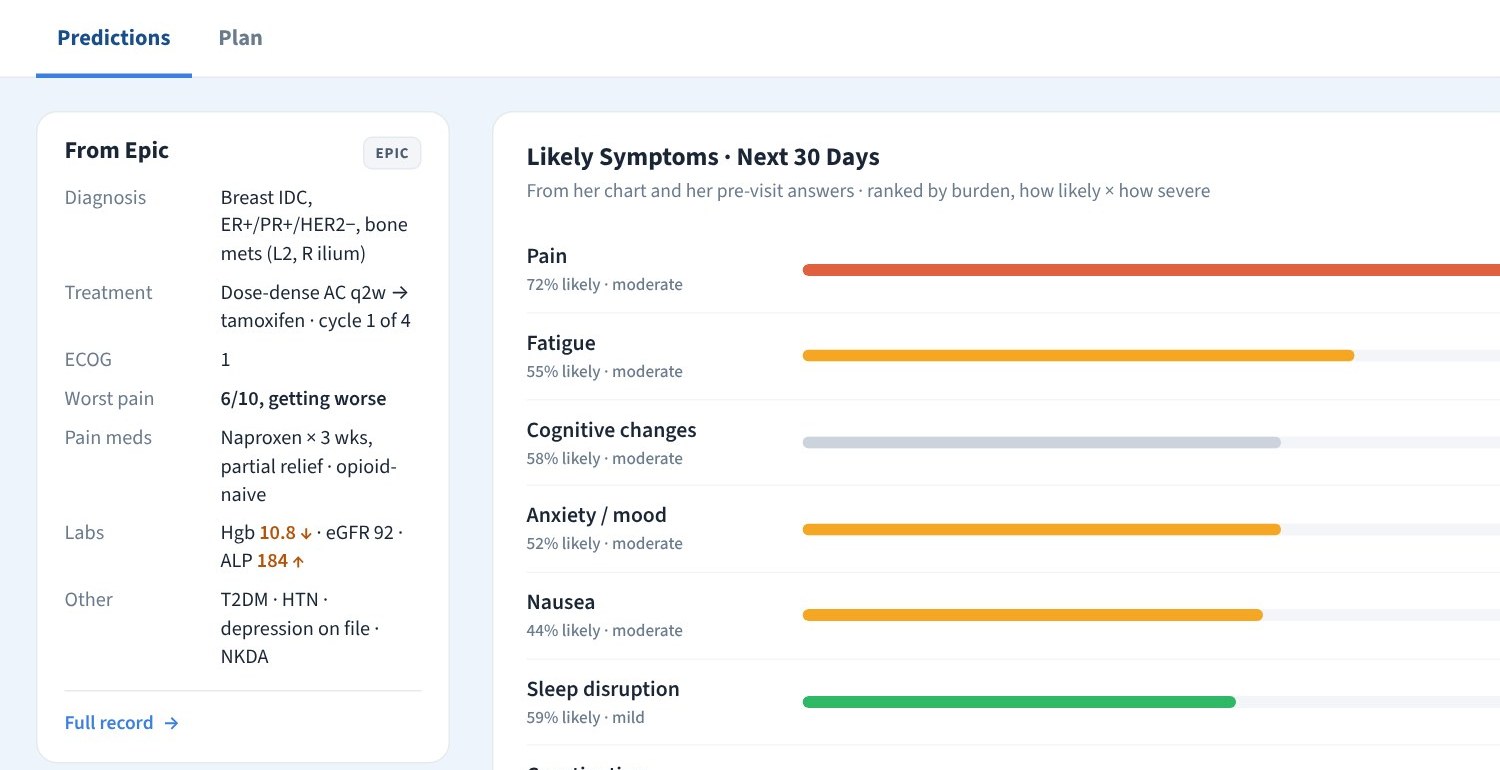
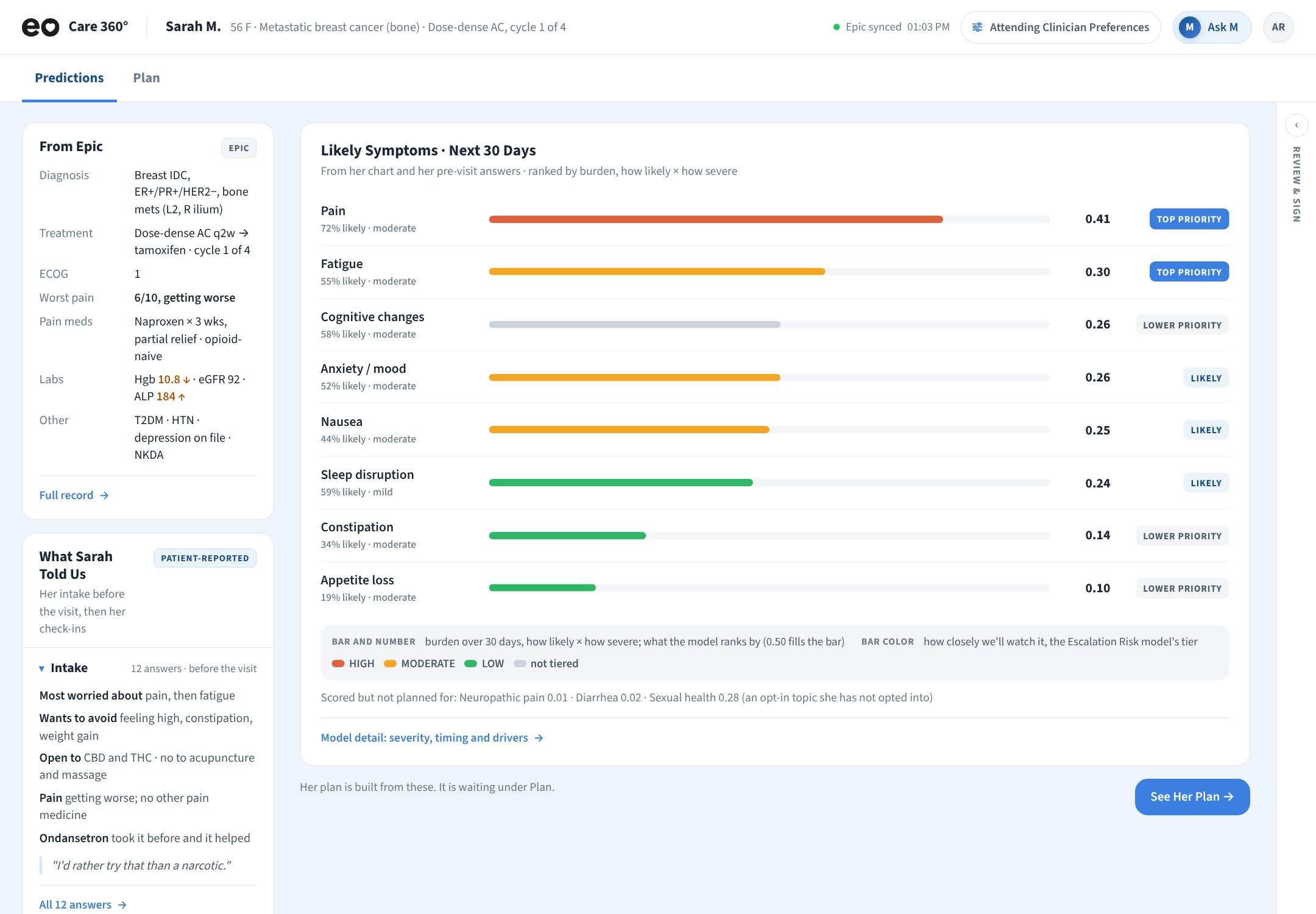
The clinician view when the chart opens: likely symptoms over the next 30 days as ranked bars, with the patient's chart and intake answers in a left rail
The clinician view, working demo build, October 2026: the chart opens on a 30-day forecast, ranked by burden. Demo patient.

My role

Associate Director, Product & Experience. The clinician experience, the patient app, the working demo builds, every diagram, eo360.care, and the walkthrough deck Health Advances used in buyer interviews.

What it does

Forecasts each patient's symptom burden for the cycle ahead, drafts one plan across prescriptions, over-the-counter, cannabinoids and behavioral care, and keeps it current inside rules the clinician sets. Models now being trained on Mayo Clinic data.

Status

Working demo builds in front of health systems since September 2026; a first clinic pilot planned at Jefferson. US provisional patent filed September 25, 2026, co-inventor. EO selected for Mayo Clinic Platform Accelerate, October 2026.

The need

30 to 40% of Cancer Spend Goes to Unmanaged Symptoms

Supportive care is reactive: delivered symptom by symptom, after the patient calls in. Symptom trackers generate calls without giving the team anything actionable, so oncologists avoid them. And how cannabinoids, over-the-counter and prescription agents perform together is largely undocumented. Four problems, four answers.

The market need

Reactive, Noisy, and Unmeasured

  • 30 to 40% of cancer spend goes to unmanaged symptoms; similar shares in other chronic disease
  • Supportive care is delivered symptom by symptom, after the patient calls in
  • Symptom trackers add inbox burden without a next step
  • No evidence base for how these therapies work alongside each other
What EO Care 360° does about it

Predict, Then Prevent

  • Symptom burden is forecast for the next treatment interval, so care acts before the spike
  • One integrated plan: Rx, OTC, supplements, nutrition, behavioral care and cannabinoids weighed together, with the patient's preferences
  • Governed autonomy: small, safe changes happen inside clinician-set rules; only true exceptions reach the clinician
  • Evidence from use: every patient followed generates real-world data on how these therapies work together
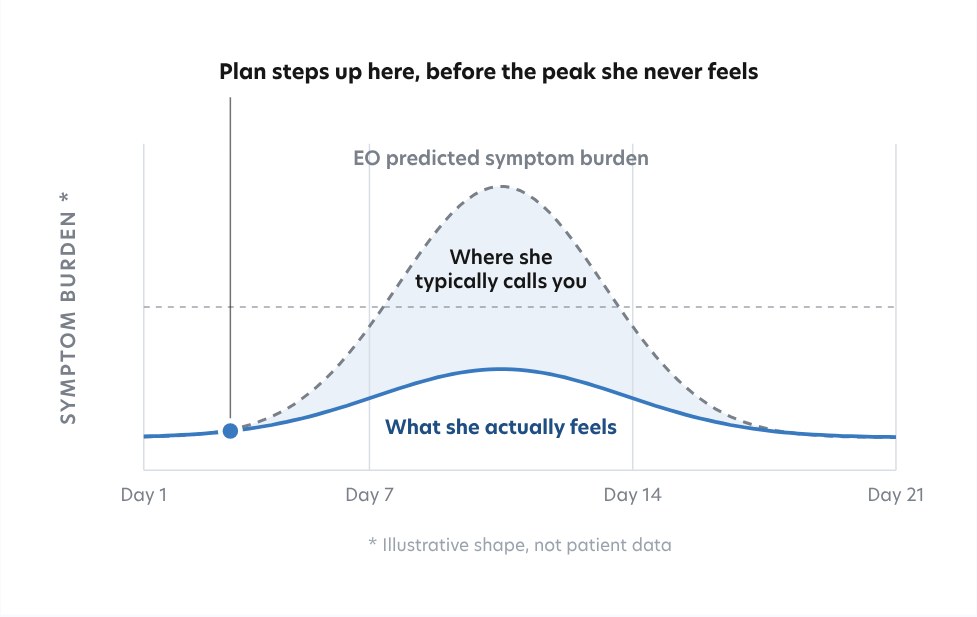
Chart: EO's predicted symptom burden rises to a peak around day 10 of the cycle, the line where she typically calls the clinic sits below it, and what she actually feels stays under both because the plan steps up on day 3, before the peak
The whole idea in one curve: the plan steps up on day 3, before the peak she never feels. The dashed line is where she would typically have called the clinic.

What it does

Two People, One Plan

The patient works from her phone. The oncologist works inside Epic, or in the standalone view. The platform sits between them. A separate product from EO's care plan, built for the clinic.

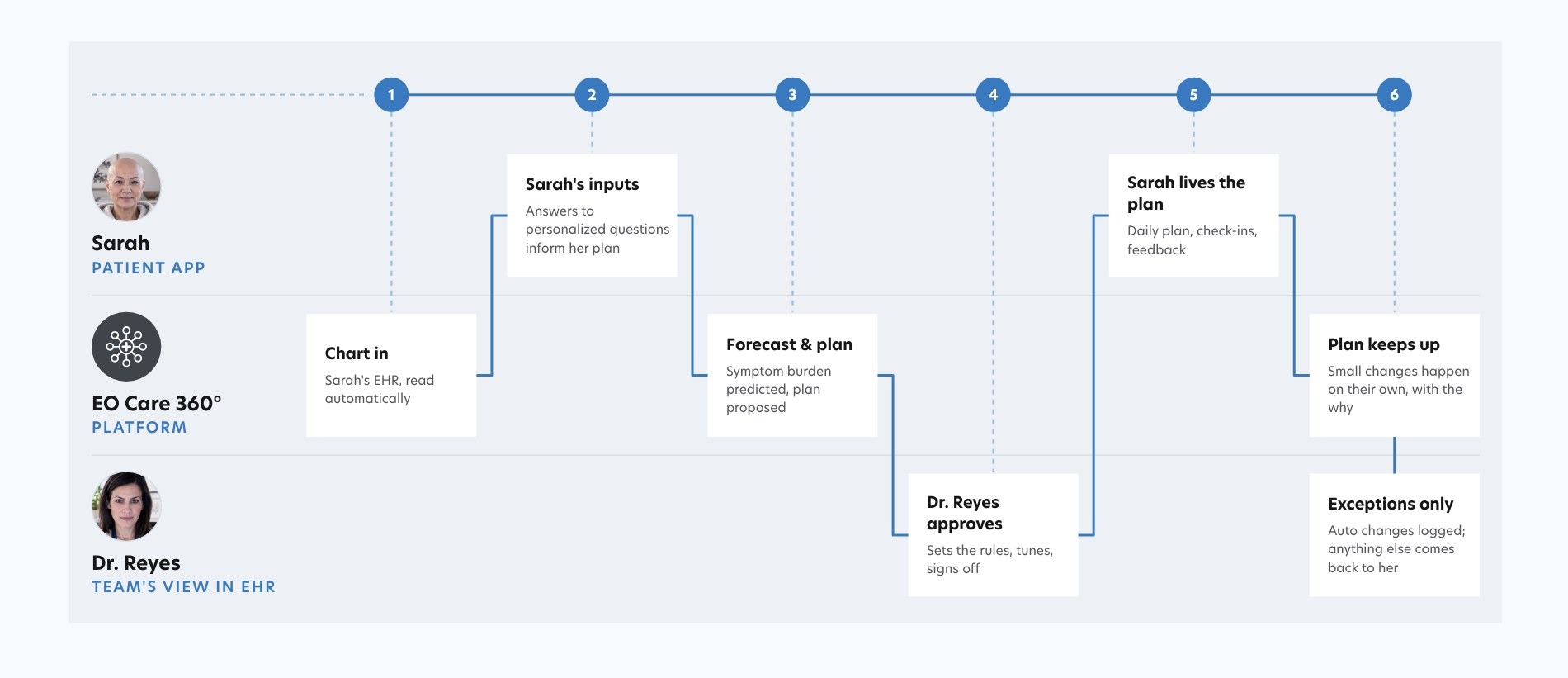
Experience flow in three lanes: Sarah on the patient app, the EO Care 360 platform, and Dr. Reyes in the EHR. Six steps run across them: chart in, Sarah's inputs, forecast and plan, Dr. Reyes approves, Sarah lives the plan, plan keeps up, with exceptions only coming back to the clinician
Six steps across three lanes. The two experiences touch at three moments: her intake feeds the forecast, the signed plan reaches her phone, and only exceptions come back to Dr. Reyes.
Patient1. Her InputsHer chart is read automatically. She answers only what the record can't: priorities, side effects to avoid, safety questions. About three minutes, once, before the visit.
Engine2. Forecast and Draft PlanBayesian models give the probability each symptom occurs and how severe, rolled into burden, with drivers and confidence. Priors from ASCO, ESMO and NCCN guidance; now being trained on Mayo Clinic data from thousands of patients.
Clinician3. Approves and Sets the RulesRanked interventions with rationale, net benefit and safety checks. She approves, modifies or declines, then decides what the system may adjust on its own. Prescriptions always come back to her.
Loop4. The Plan Keeps UpDaily check-ins feed the curve. Small changes happen on their own, with the why, inside her rules. Exceptions come back to the clinician. What the patient reports trains the next prediction.
The engine

What Goes In, What Comes Out, and the Rules in Between

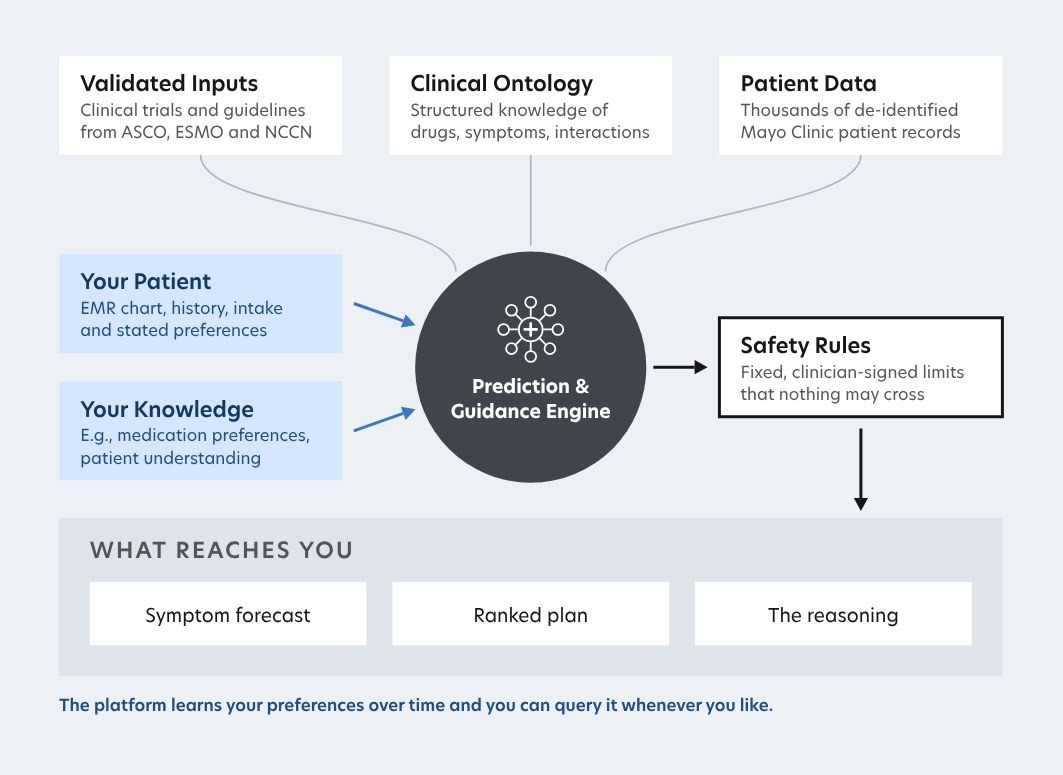
Four kinds of input: validated guidance from ASCO, ESMO and NCCN with a clinical ontology, de-identified Mayo Clinic patient data, this patient's own chart and preferences, and the clinician's own knowledge, like medication preferences. One gate: safety rules the clinician signs, that nothing crosses. Three outputs: a symptom forecast, a ranked plan, and the reasoning behind both. Bayesian models make the predictions and the recommendations; language models only write, never decide.

Diagram of the prediction and guidance engine: validated inputs from ASCO, ESMO and NCCN, a clinical ontology and de-identified Mayo Clinic patient data feed the engine, along with this patient's chart and the clinician's own knowledge. The engine passes through clinician-signed safety rules, and what reaches the clinician is a symptom forecast, a ranked plan and the reasoning
Nothing reaches the patient until the clinician approves it, and the clinician only sees what the rules let through.

The screens

Clinician and Patient Screens, in Order

ClinicianIn order, from opening the chart to signing
Clinician Predictions tab: likely symptoms over the next 30 days as bars, with the patient's chart and intake answers in a left rail
1The chart opens on a 30-day forecast. Bar length is burden (how likely times how severe), color is how closely we'll watch.
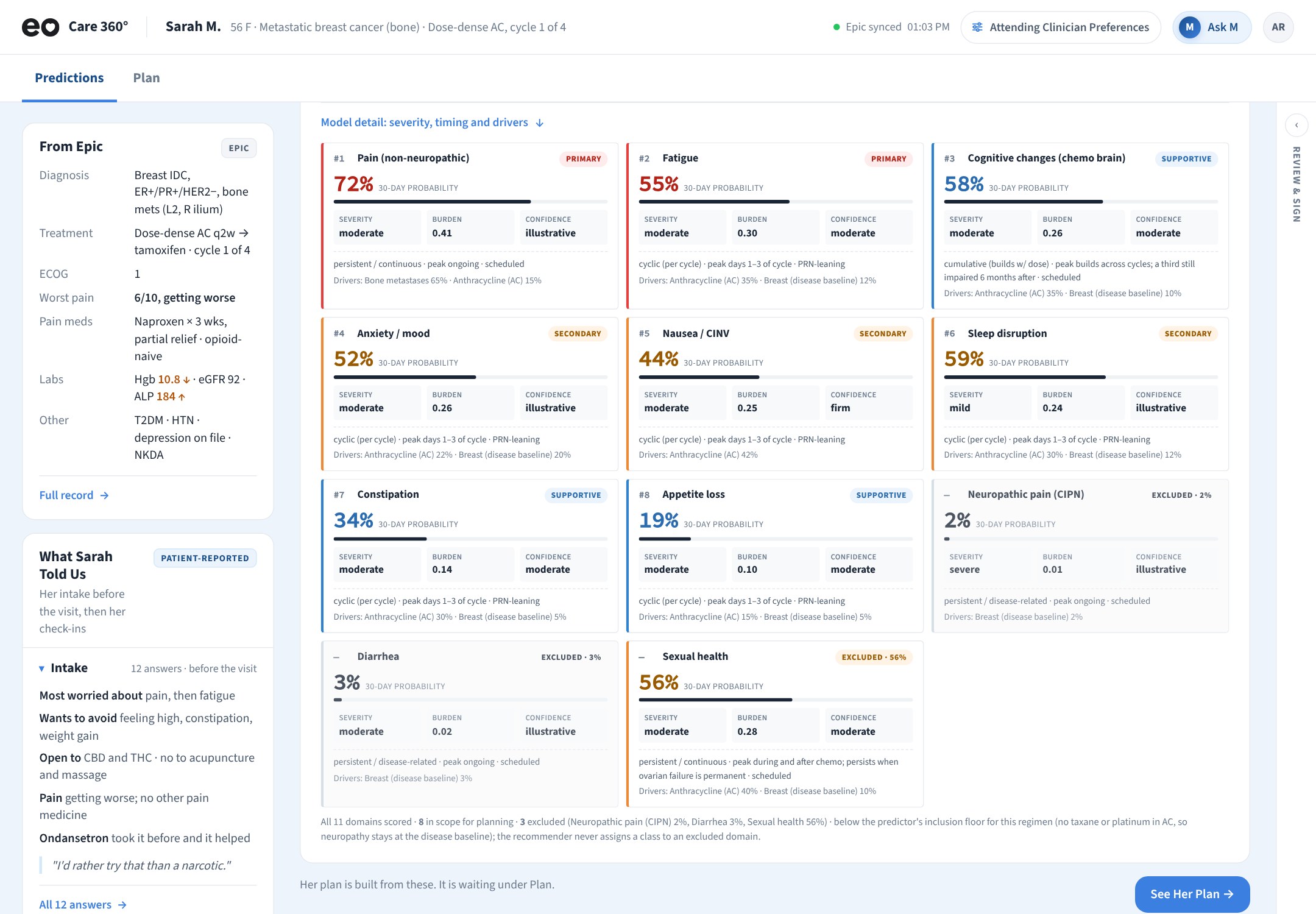
Model detail expanded: a card per symptom with 30-day probability, severity, burden, confidence, timing (persistent or cyclic, peak days) and drivers such as bone metastases or anthracycline
2Model detail, one card per symptom: probability, severity, confidence, when it peaks in the cycle, and what's driving it. The three domains left out of the plan are shown too.
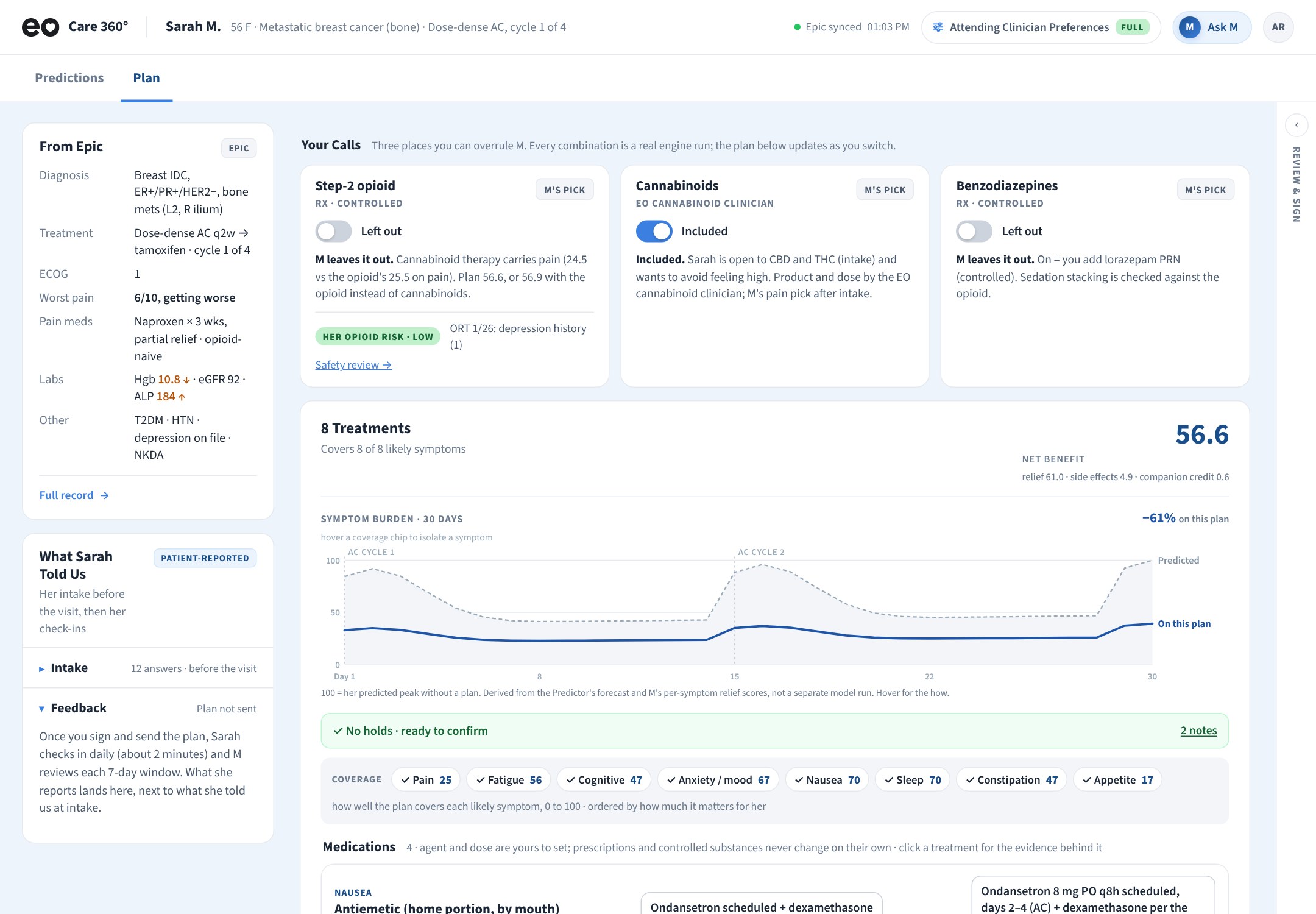
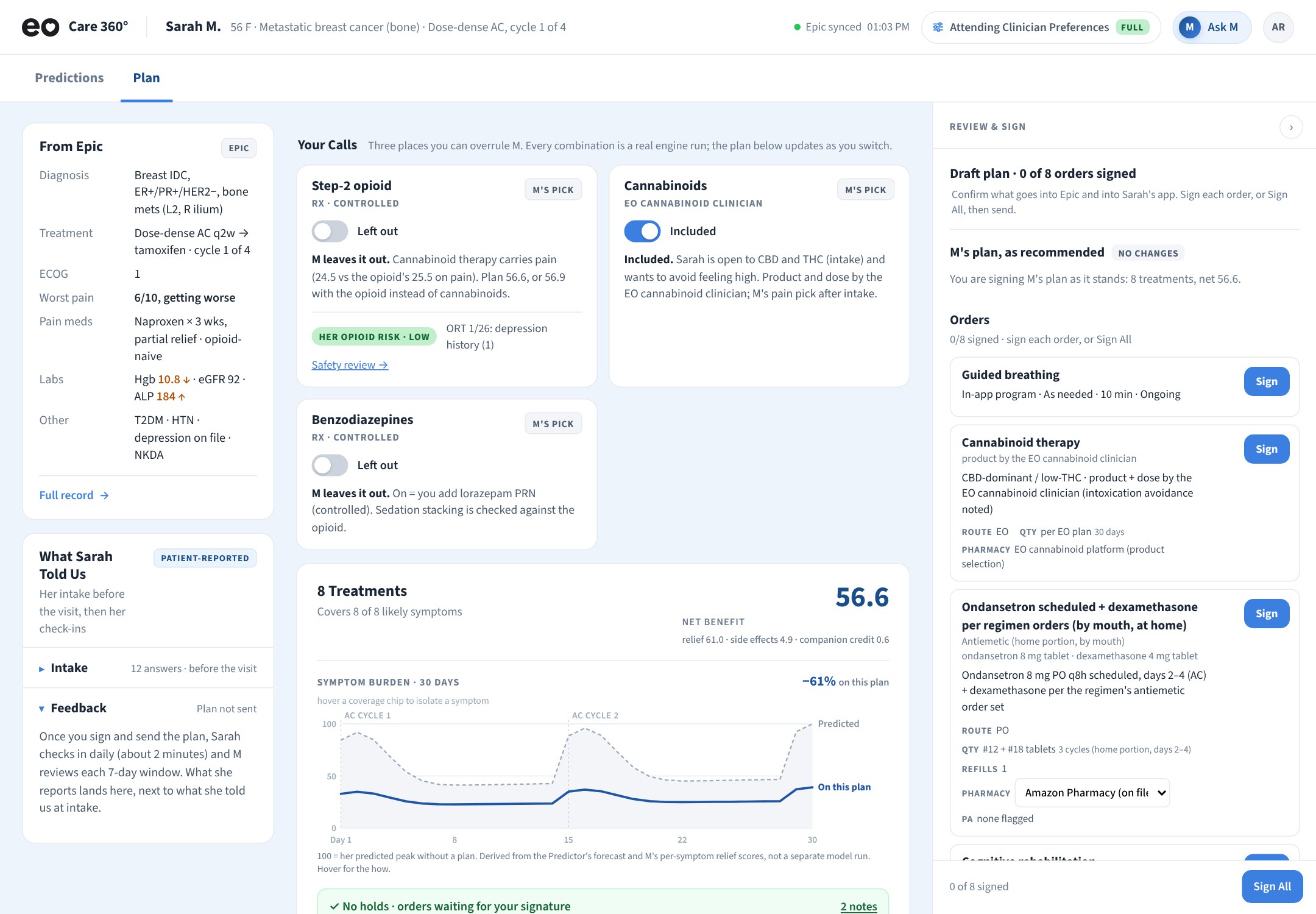
Clinician Plan tab: Your Calls cards for step-2 opioid, cannabinoids and benzodiazepines, then an 8-treatment plan with a net benefit score and a 30-day symptom burden chart
3Your Calls: three places the clinician can overrule M, with the whole plan rescored as they switch.
Review and Sign panel open beside the plan: Draft plan, 0 of 8 orders signed, each order with its own Sign button and a Sign All at the bottom
4Review & Sign stays open beside the plan: every order, signed one at a time or all at once. Nothing reaches Epic or Sarah's app until she signs.
PatientIn order, from intake to the first week
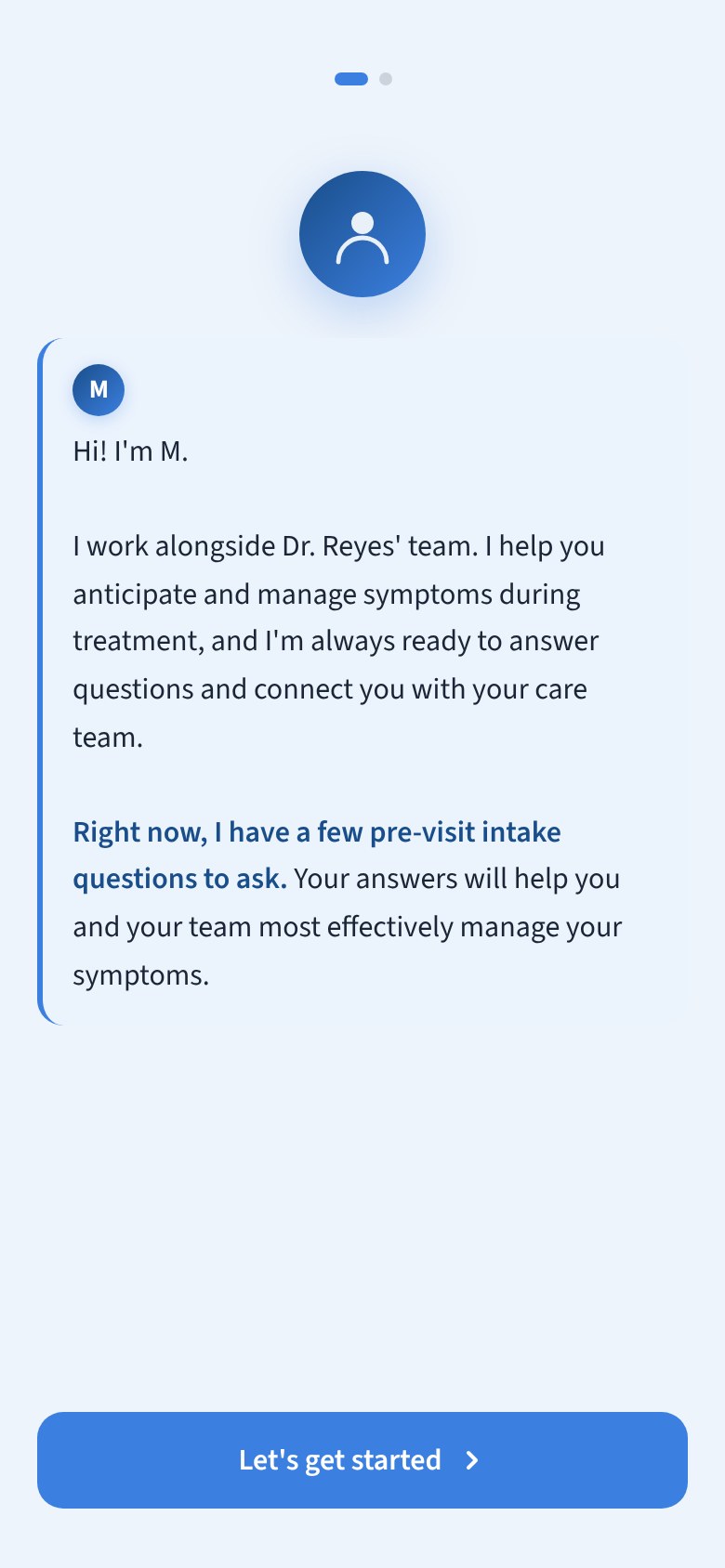
First screen: Hi! I'm M. I work alongside Dr. Reyes' team, help you anticipate and manage symptoms during treatment, and have a few pre-visit intake questions. Let's get started
1M introduces itself, and says what it's for, before it asks anything.
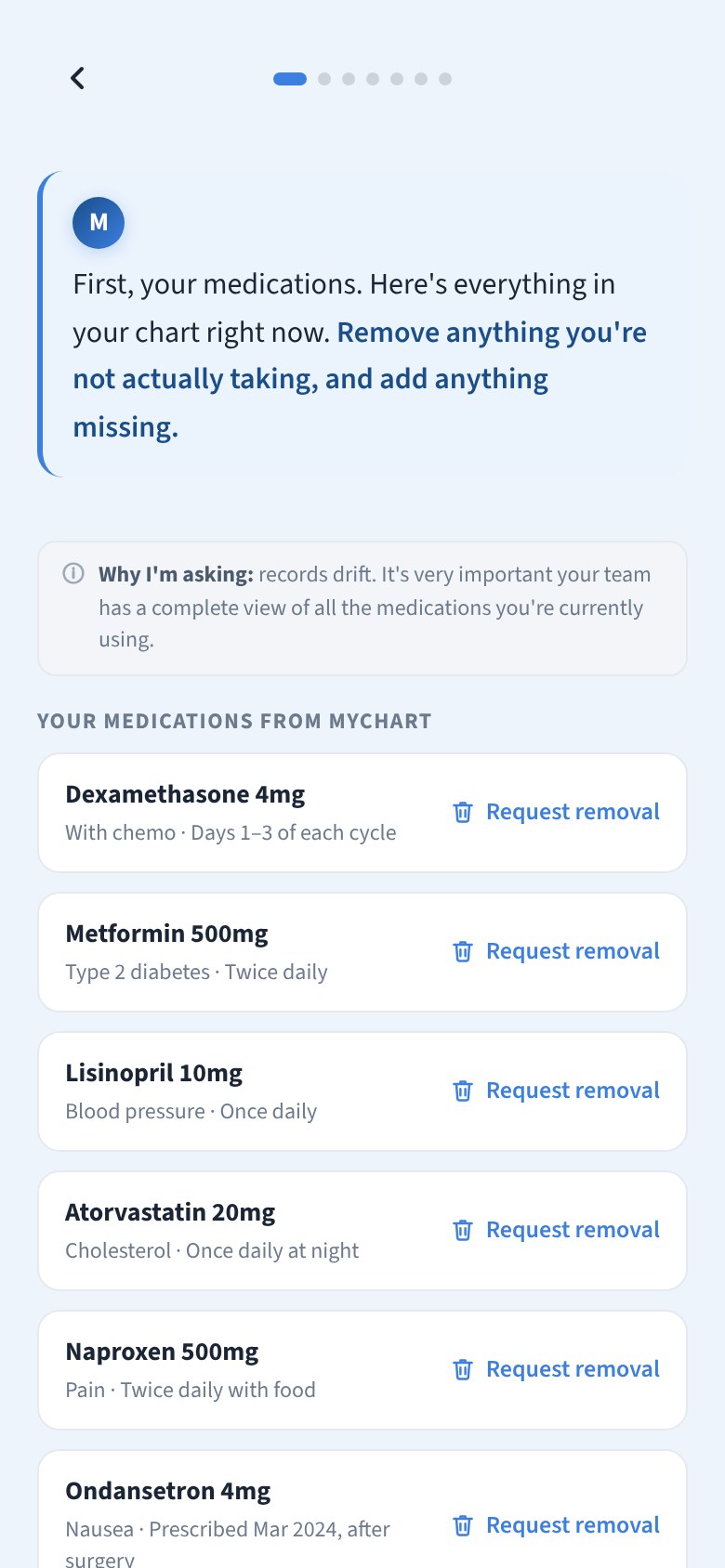
Patient intake: M asks the patient to confirm the medications from her chart, six of them, each with a Request removal link
2Intake before the visit, starting with the meds already in her chart.
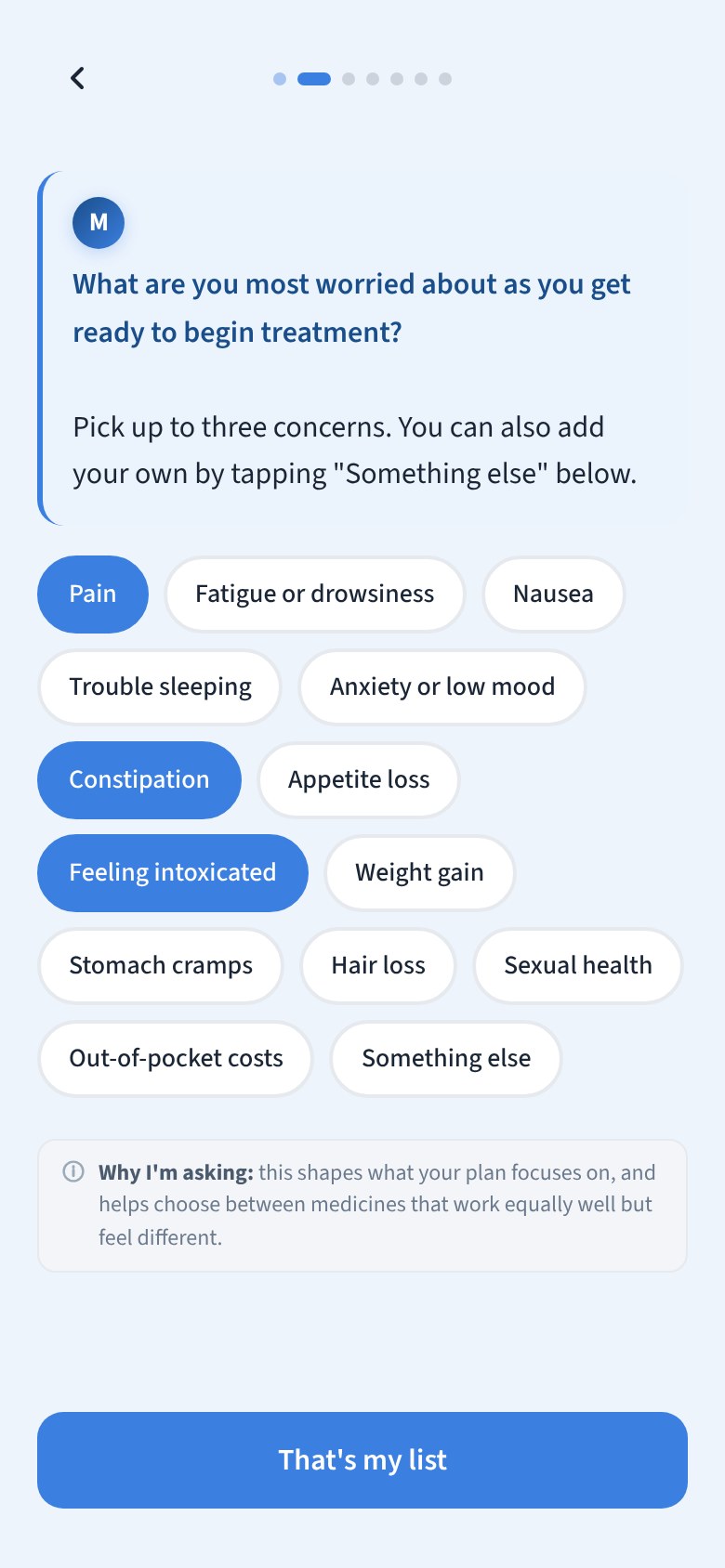
What are you most worried about as you get ready to begin treatment? Pick up to three concerns: pain, constipation and feeling intoxicated selected
3Her top three concerns, which shape what the plan focuses on.
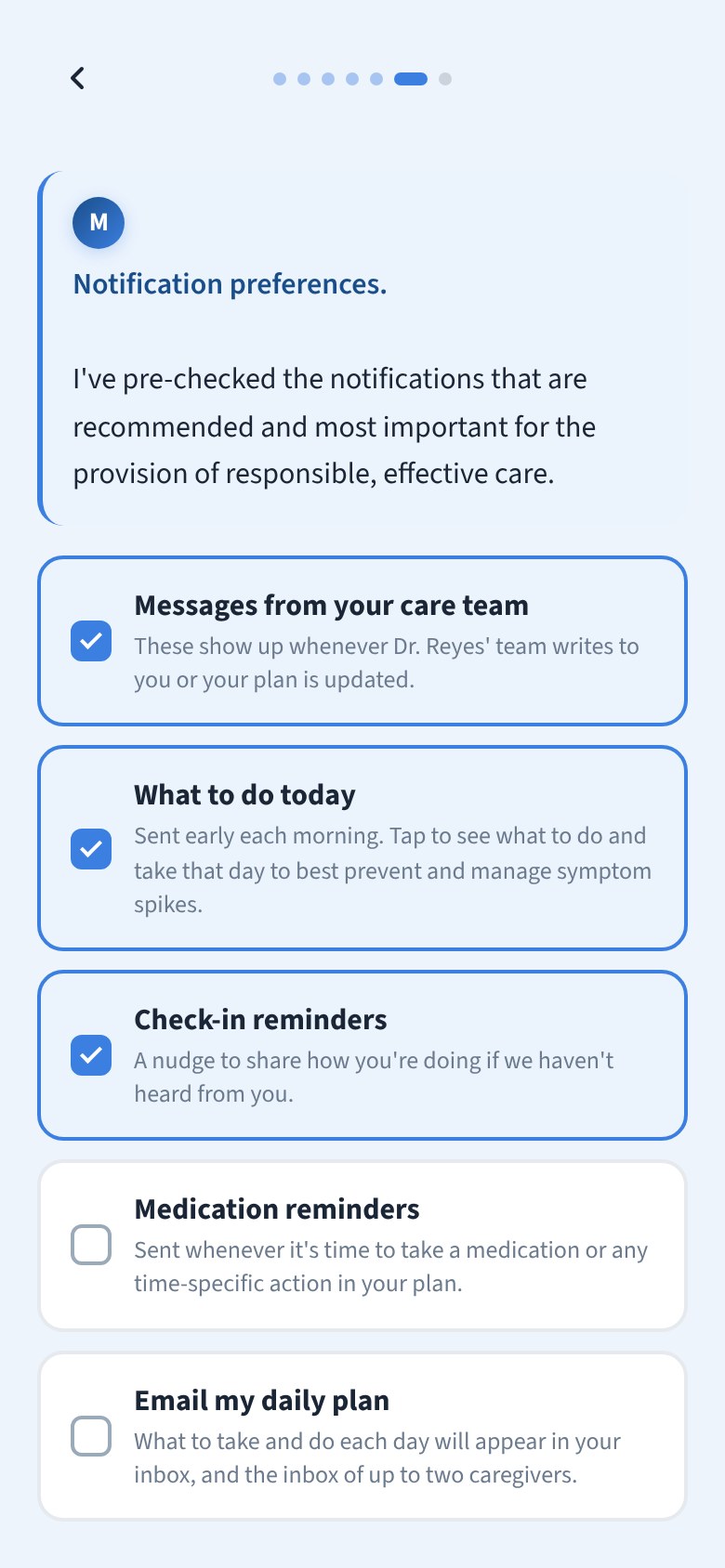
Notification preferences: messages from the care team, what to do today and check-in reminders checked to start; medication reminders and email my daily plan unchecked
4Notifications, chosen up front. The recommended ones are pre-checked; email needs its own consent.
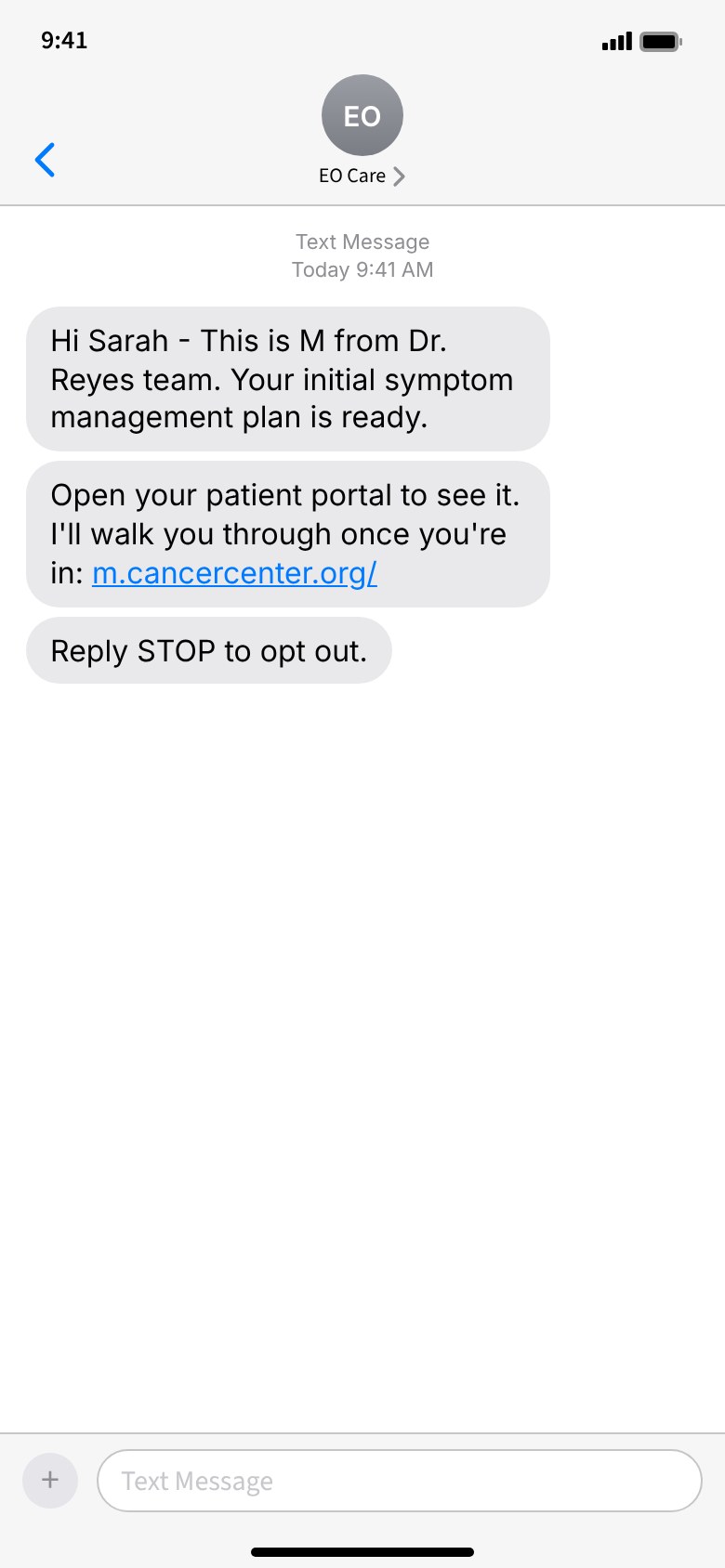
Text message from M: your initial symptom management plan is ready, open your patient portal to see it
5Once the clinician signs, a text says her plan is ready.
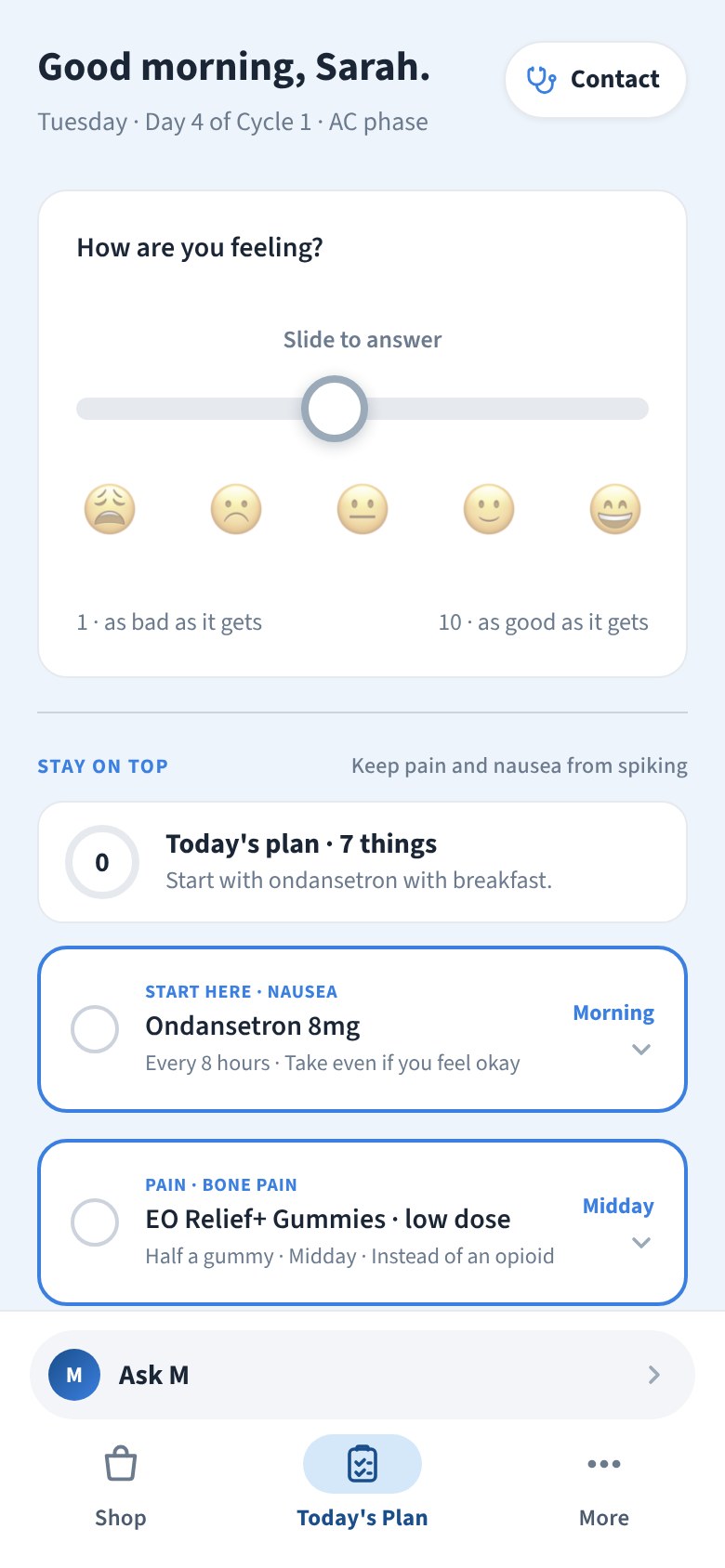
Today's Plan: Good morning, Sarah, day 4 of cycle 1. How are you feeling? with a 1 to 10 slider, five faces, then Stay on top: today's plan, 7 things, starting with ondansetron
6Today's Plan opens on one question. The slider starts in the middle and gray, so an unanswered day leans neither way.
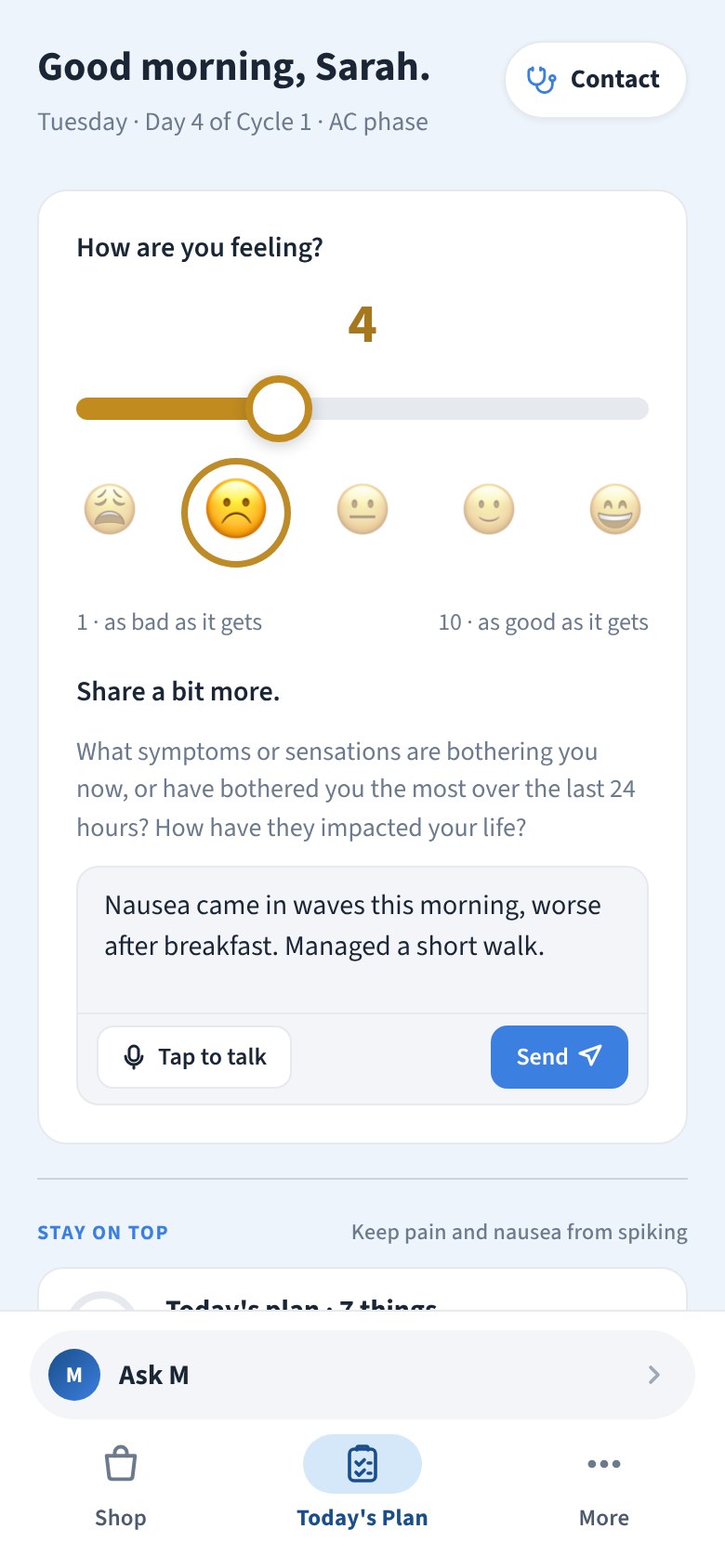
The check-in answered at 4, the frowning face lit, and the card expanded with Share a bit more: a note typed about nausea in waves after breakfast, Tap to talk and Send
7Answered: the face lights, the card opens for a few words, typed or dictated.
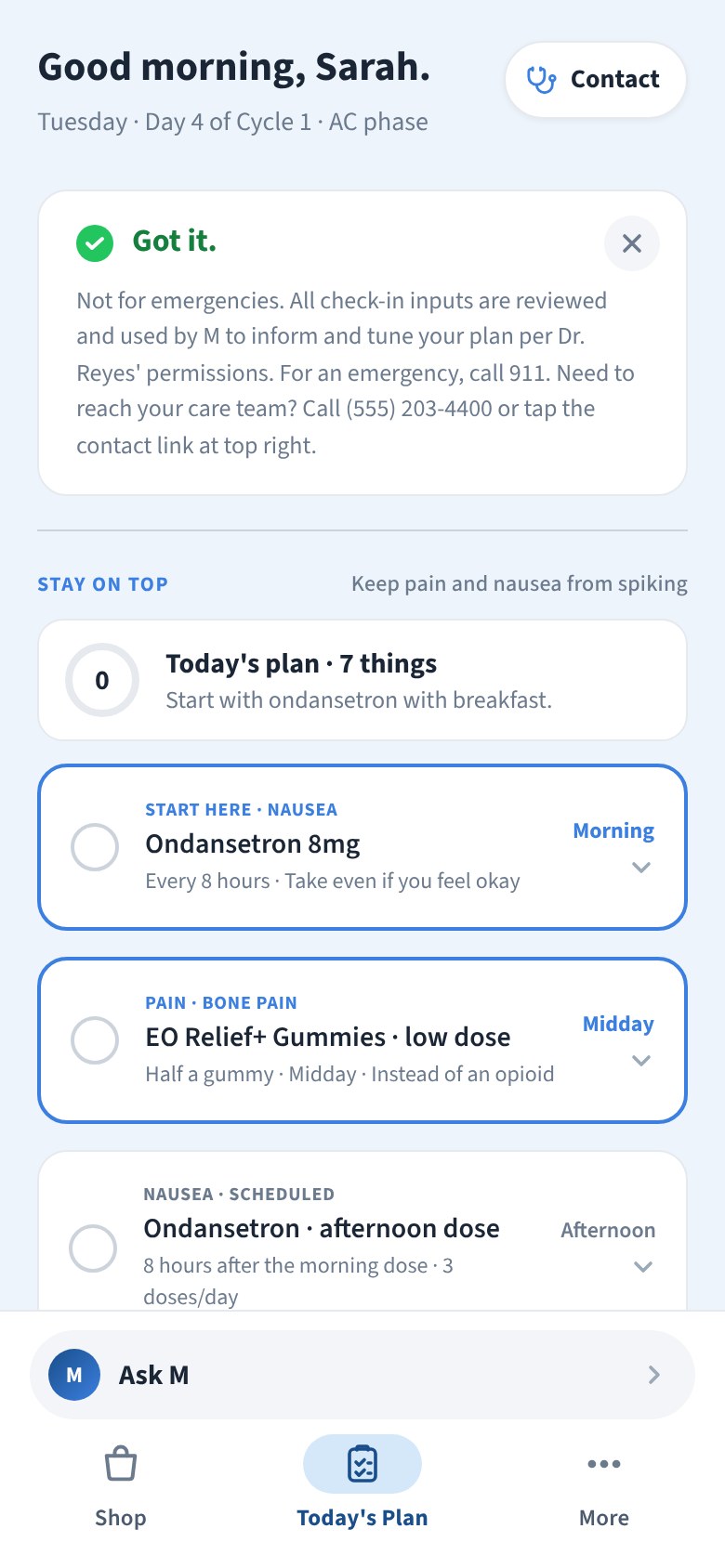
After Send: a Got it card with a green check, the not-for-emergencies note and how to reach the care team, then Stay on top below
8Sent: the card becomes the acknowledgement, in place. No promise that a person is reading it.
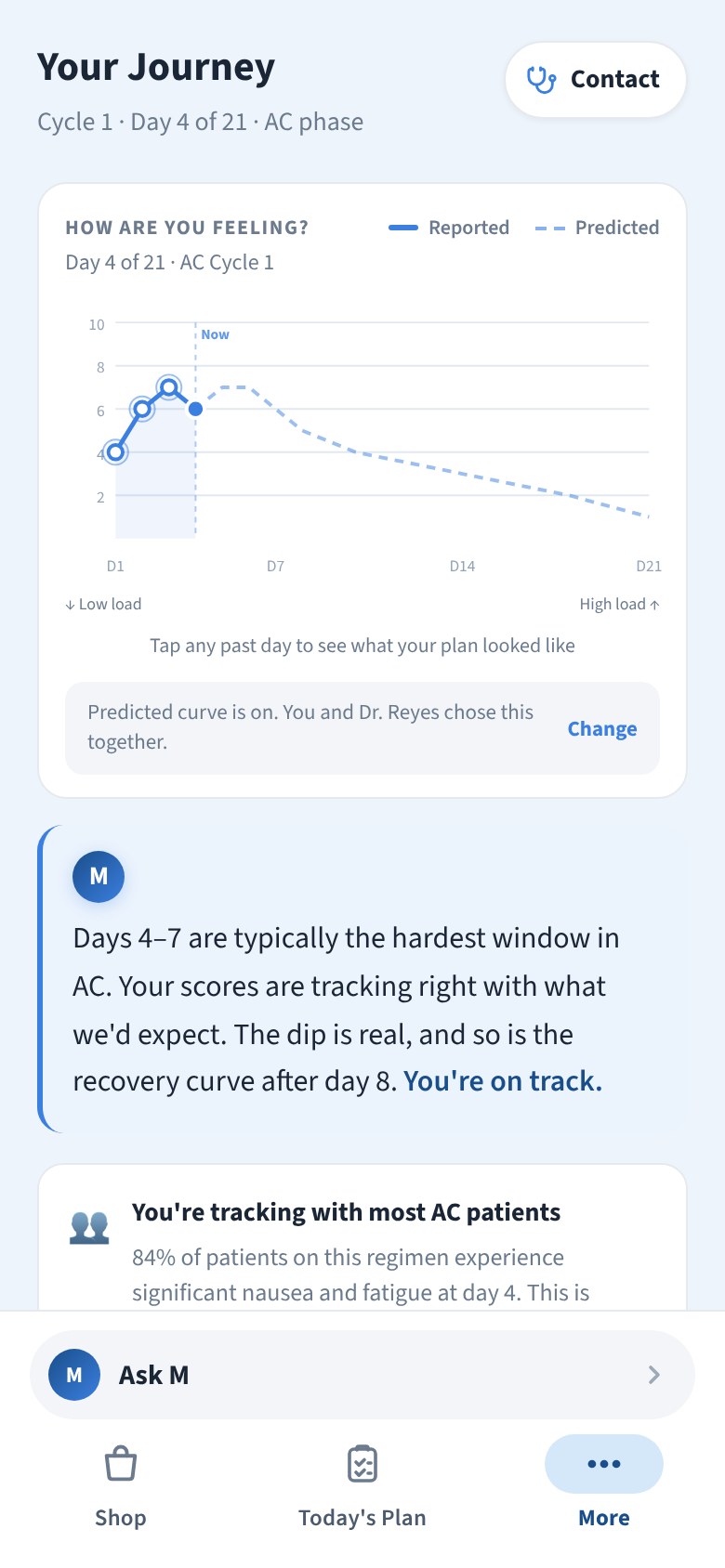
Your Journey: reported scores against the predicted curve for the cycle, with M's note that days 4 to 7 are typically the hardest window in AC
9Journey: her scores against the predicted curve, which she and her clinician chose to show.
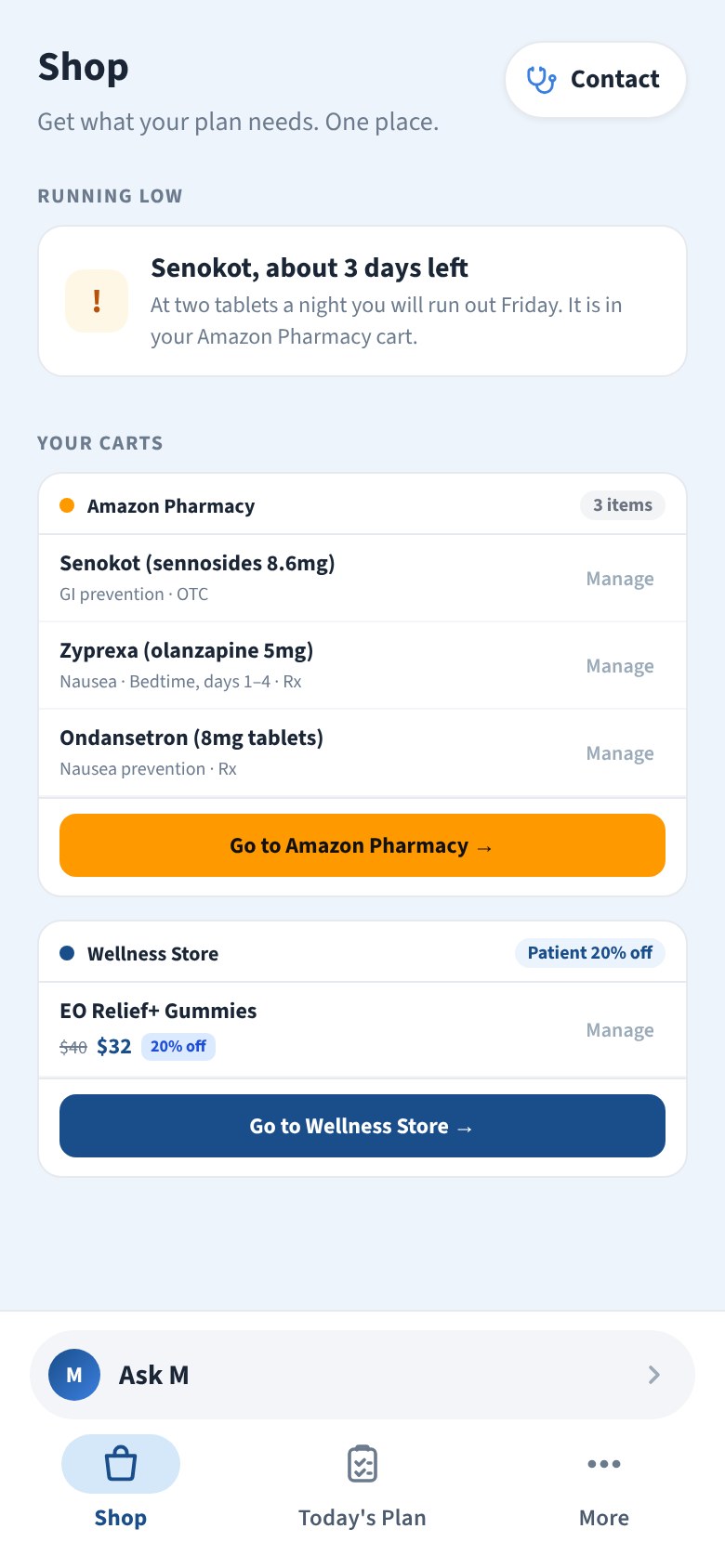
Shop: Senokot about 3 days left, and the carts at Amazon Pharmacy and the Wellness Store, each with the items the plan needs
10Shop: what the plan needs, in one place, with a nudge before anything runs out.

Key decisions

Three Calls That Shaped 360°

The choices that made the system usable in a clinic, each with the piece of the interface it produced.

Call 1

The Forecast Is on Screen When the Chart Opens

Predictions and Plan are tabs a clinician moves between, with no generate buttons. The forecast is there at open and the plan is already waiting under Plan, so nobody waits on a spinner between patients.

The clinician view at open: Predictions and Plan tabs, the chart in a left rail, and the ranked 30-day forecast already drawn
At open: tabs, the chart, the forecast. Nothing to press first.

Call 2

Two Questions, Two Channels

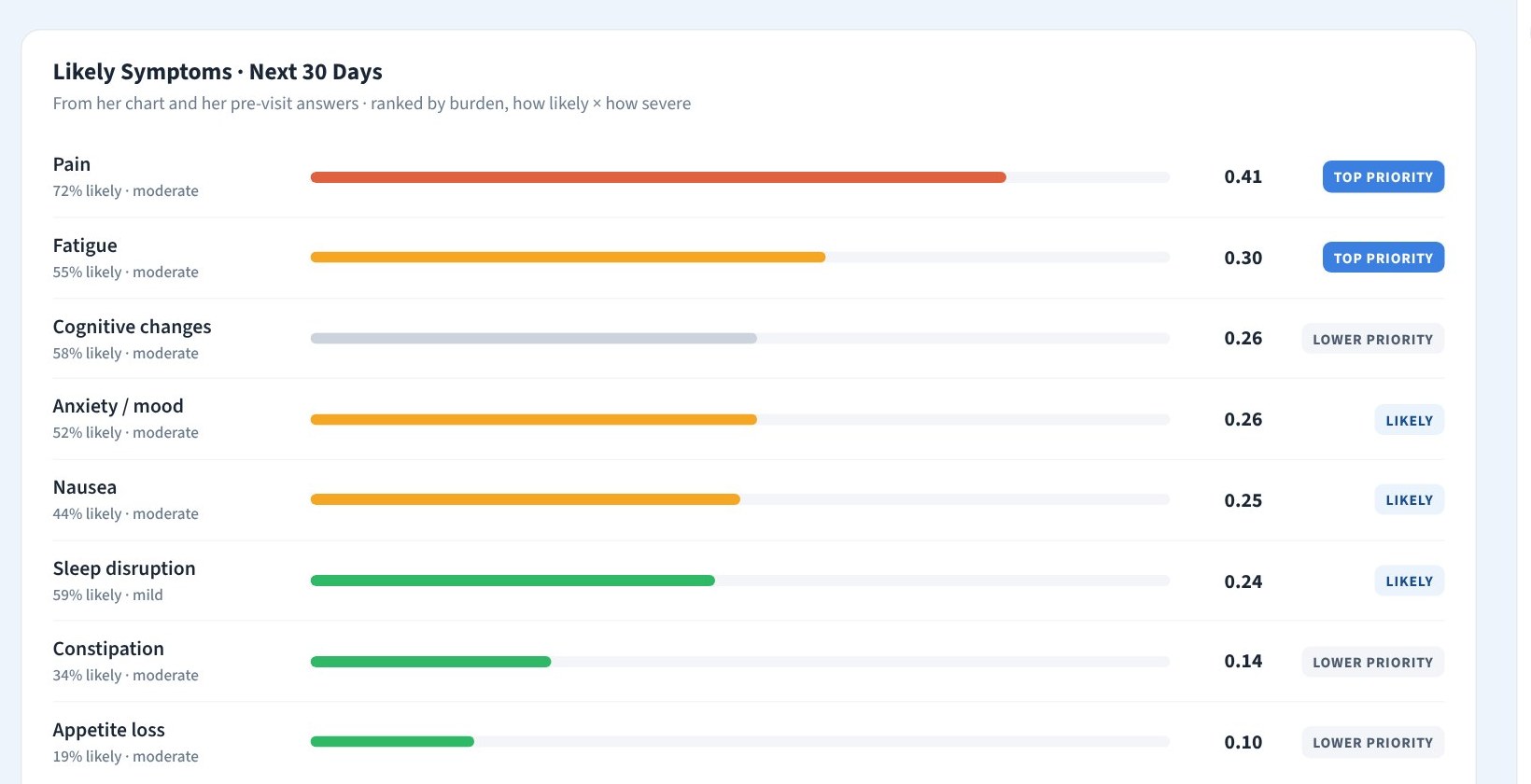
On the prediction bars, length is burden, how likely times how severe, which is what the model ranks by. Color is how closely we'll watch it. Burden and escalation risk answer different questions, so they get different channels and a clinician reads both at a glance.

The prediction bars up close: each symptom with its probability and severity, bar length for burden and color for watch level, with a priority tag on the right
Length ranks, color warns. Pain and fatigue are long and orange; sleep is long and green.

Call 3

One Patient App for Every Version of 360°

Oncology in Epic, oncology on its own, older adults and the first clinic pilot all share one patient app. Same screens, same words, same M. A version is a set of switches and content, never a different layout, so every improvement reaches every patient.

Today's Plan: Good morning, Sarah, day 4 of cycle 1, how are you feeling, with the day's plan belowYour Journey: reported scores against the predicted curve for the cycle
The same two screens in every version: one question a day, and her scores against the curve.

Bringing 360° to market

The Site That Goes Out Before the Demo

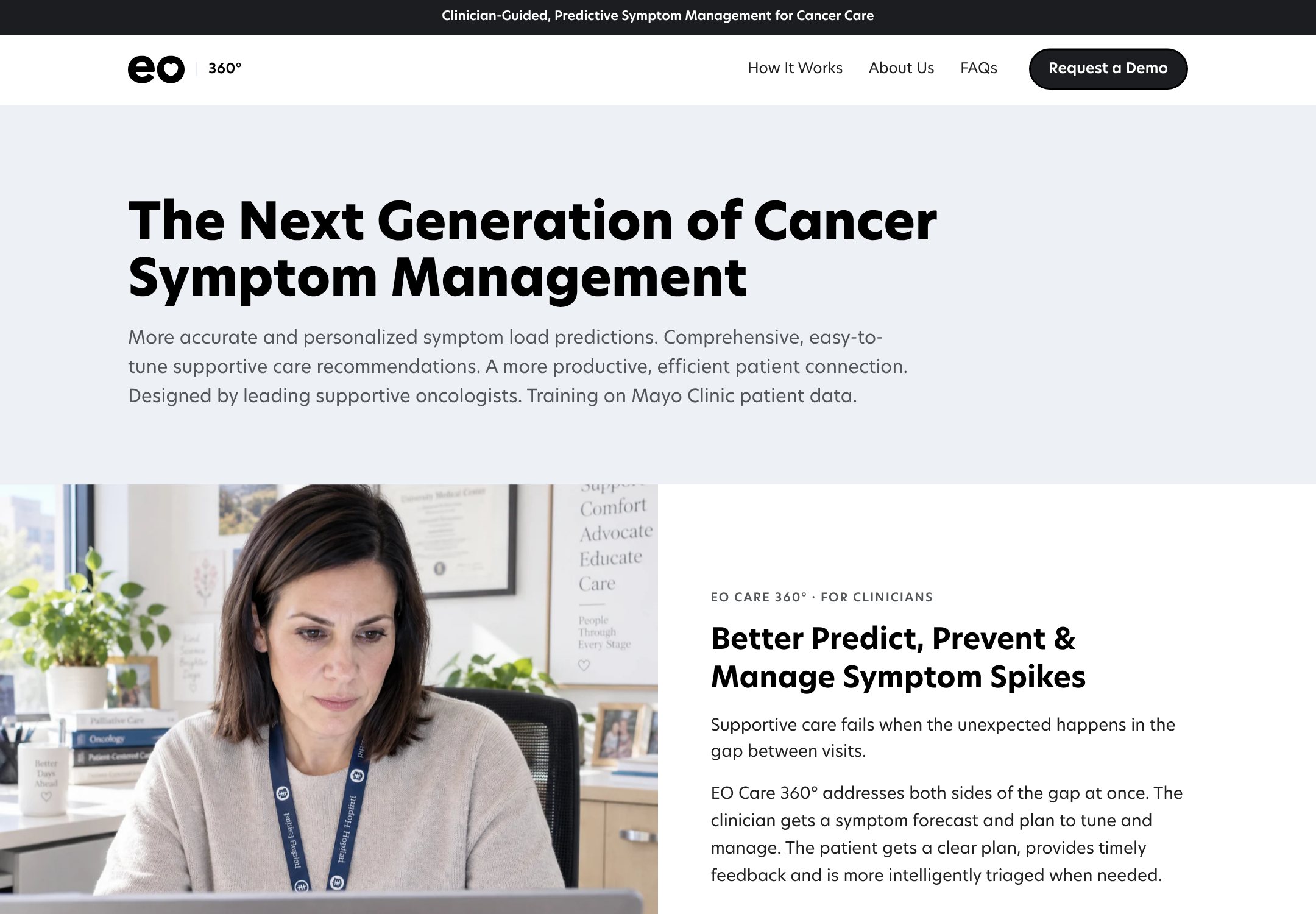
Separate from the clinical product: eo360.care is the marketing site EO sends a health system before a demo. I designed and built it in code, wrote it with EO's CEO, and drew the diagrams on this page for it. The same material became the walkthrough deck Health Advances used in buyer interviews.

Visit eo360.care ↗

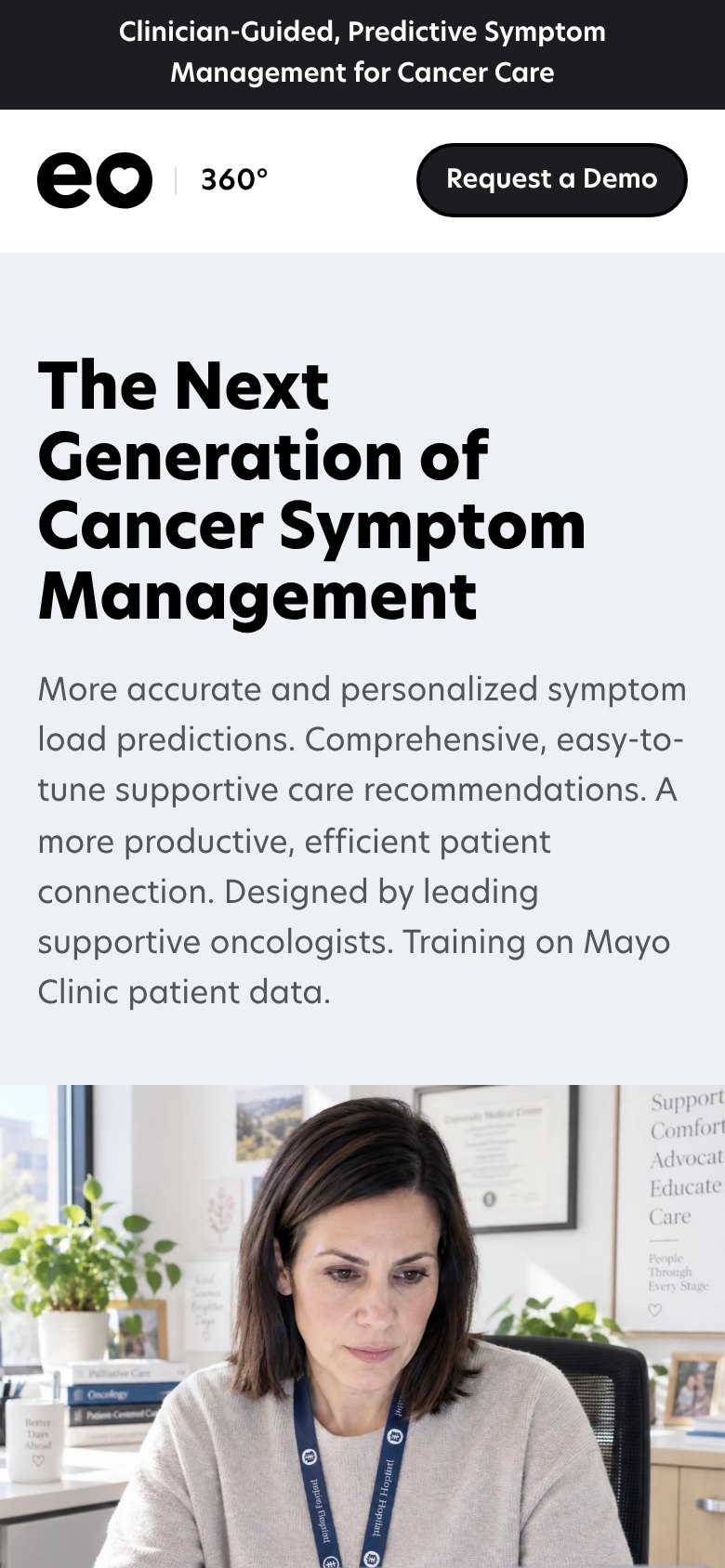
eo360.care on desktop: The Next Generation of Cancer Symptom Management, with a Request a Demo button and a photo of an oncologist at her desk eo360.care on a phone

What happened

Where the Product Is, and What Has Been Recognized

Two kinds of evidence, kept apart: what exists as software and what others have validated. Nothing here is deployed to patients yet.

Product progress

Working Builds, Not Yet in a Clinic

  • The clinician view and the patient app exist as working demo builds, shown to health systems since September 2026 and used by Health Advances in buyer and expert interviews. The clinician prototype is open to click through.
  • In the demo a clinician can read the forecast, overrule the model on specific calls, set what the system may adjust on its own, and sign orders one at a time or all at once.
  • The first real software build is planned for a clinic pilot at Jefferson. Four versions are planned: oncology in Epic, oncology standalone, older adults, and the pilot.
Research and recognition

A Filing, a Cohort, and Data to Train On

  • US provisional patent filed September 25, 2026, assigned to EO Care, Inc. I'm a co-inventor, one of eight, alongside EO's founders, clinical team and a Mayo Clinic collaborator. Pending, not granted.
  • EO Care selected for the October 2026 cohort of Mayo Clinic Platform Accelerate, the 30-week track: de-identified clinical data, mentorship and technical support to refine the models. The program's largest cohort to date, 31 companies.
  • The models are being trained on Mayo Clinic data from thousands of patients. What that establishes is the data pathway, not a measured clinical outcome; those come with the pilot.

Interested in talking through this project?